I decided to take my first real step into AI model training by doing something concrete: I built a computer dedicated to the task.
This is not a “plug-and-play” hobby project for me. I have no prior experience training AI models, and I am fully aware that the learning curve will be steep. There will be days when things work, days when nothing makes sense, and moments when I question why I chose such a demanding path. But that is exactly the point. I want to learn by doing, and I want to grow through the difficult parts—not avoid them.
I am approaching this as a step-by-step journey rather than a one-off experiment. The long-term goal is to build real competence: understanding the tooling, learning how models behave during training, and developing the ability to run meaningful experiments on my own. I also plan to document the process as I go.
The computer: my starting platform for AI training
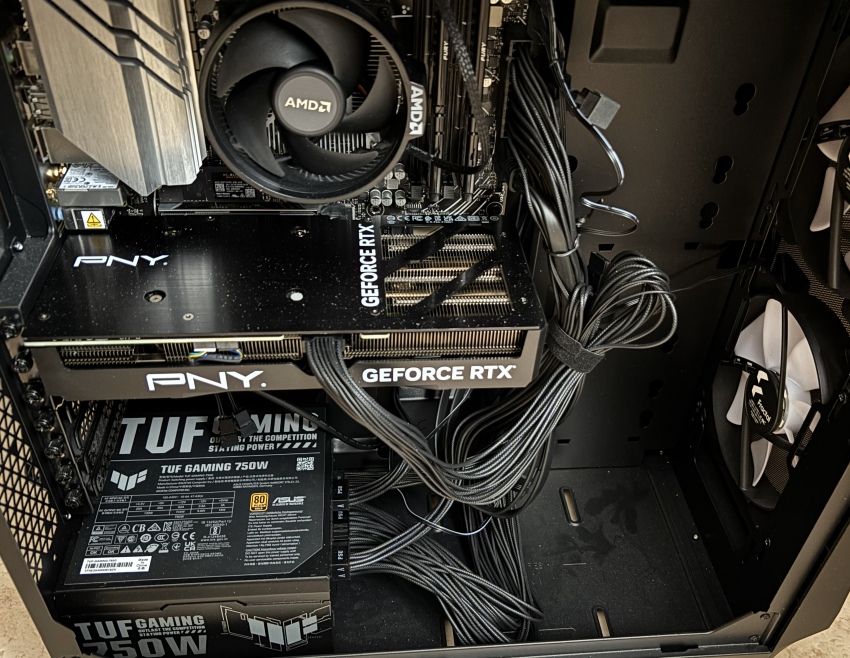
The system I built is designed as a single-GPU training computer—a practical development machine for prototyping, experimenting, and fine-tuning models rather than attempting large-scale training from scratch.
Build summary
- GPU: NVIDIA GeForce RTX 4070 SUPER (12 GB GDDR6X)
- CPU: AMD Ryzen 5 8500G
- RAM: 32 GB
- Storage: 1 TB NVMe
- Motherboard: ASUS PRIME B650M-A WiFi
- PSU: ASUS TUF Gaming 750W Gold
AI’s Evaluating of my computer
What the build is genuinely good at
The heart of this workstation is the GPU, and that choice sets the tone for what I can realistically do. The RTX 4070 SUPER gives me modern NVIDIA Tensor Core capability and enough GPU performance to make model training feel real and responsive—especially in the areas where a single-GPU setup shines:
- Computer Vision training and fine-tuning: classification, detection, segmentation, and transformer-based vision models with sensible batch sizes.
- Small-to-mid NLP / LLM fine-tuning: especially when using parameter-efficient methods like LoRA/QLoRA, where the GPU can handle serious work without needing workstation-class VRAM.
- General ML workflows: tabular models, experimentation pipelines, evaluation, and iterative prototyping.
This system is also built with stability in mind. The power supply has comfortable headroom for the GPU’s requirements, and the platform has decent I/O options for expanding storage later—important because AI work tends to grow beyond the first SSD faster than expected.
The limits I’m choosing to accept (and learn around)
At the same time, this build makes my constraints very clear—and those constraints will shape my training approach from day one.
The main hard limit is VRAM: 12 GB.
That means I will not train large models “the brute-force way.” Instead, I’ll learn the practical techniques that real developers use on limited hardware:
- mixed precision training (FP16/BF16),
- gradient accumulation,
- gradient checkpointing,
- careful control of batch size and sequence length,
- LoRA/QLoRA and other parameter-efficient fine-tuning methods,
- and, when needed, CPU/NVMe offloading (with the tradeoff of slower iteration).
32 GB of RAM is workable, but not limitless.
As soon as offloading, large datasets, heavier preprocessing, or multiple workers enter the picture, memory pressure becomes a quality-of-life issue. It is not a failure point, but it is an area I expect to grow into—most likely by moving to 64 GB once the workflow demands it.
1 TB NVMe is enough to start, but not enough to scale.
Datasets, caches (especially Hugging Face), checkpoints, experiment artifacts, and multiple environments add up quickly. Realistically, additional SSD capacity will be one of the earliest upgrades if the project expands.
What this workstation makes practical—and what it doesn’t
As an AI training platform, this build is a strong mid-tier starting point.
It is well-suited for:
- prototyping,
- fine-tuning,
- experiments that require iteration speed,
- building competence with modern training stacks.
It is not suited for:
- pretraining large language models from scratch,
- training large diffusion models from scratch,
- full-parameter fine-tuning of large LLMs in a comfortable way.
Those “big league” workloads are typically cloud or multi-GPU territory, and it is important to be honest about that from the beginning. My goal here is not to imitate a datacenter. My goal is to build skill, discipline, and working knowledge on a machine that forces me to understand efficiency.